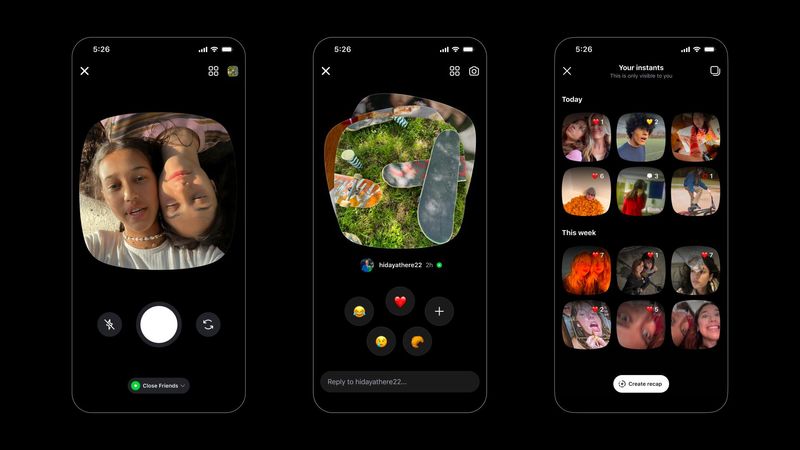

In a world where everything moves at lightning speed, Instagram has introduced a new way to instantly share photos with friends.
The platform released Instants on May 13, a feature that allows users to share “spontaneous, unfiltered photos– with friends.” Photos disappear after friends view them.

“Instants are ephemeral to viewers but are saved in your archive for up to a year and can be reshared as a recap to Stories,” Instagram said in a news release.
Friends can also react and reply to the image, with replies going straight to DMs.
Here’s what to know about Instagram Instants.
What are Instants?’
Instants share everyday photos that disappear after your friends view them. The feature can be found on the bottom right corner of the Instagram inbox. You can share Instants with specific friends or followers, according to Instagram.
How to get to Instagram Instants
Here’s are the steps provided by Instagram:
• Go to your Instagram inbox and tap the mini stack of photos at the bottom right corner.
• You can add a caption (unlike stories, you add the caption first!), but can’t further edit instants.
• Choose who to share your instants with – Close Friends or followers you follow back. Your friends can react, reply, and share instants as well.
• Tap the white button below the camera to share as many times as you want. An undo button will automatically appear the moment you share an instant in case you want to quickly take it back before it gets shared with friends.
• Instants you share will show up as a stack of photos in the bottom right corner of your friends’ inboxes, and disappear after viewed.
There’s also an Instants companion app for quicker camera access, according to Instagram.
Turn off Instants Instagram
You’ll have to visit Instagram’s in-app controls which include block, mute and restrict all that will apply to instants.
To turn off Instants completely, follow these steps from The Tab (we tried it and it works).
Natassia Paloma may be reached at npaloma@gannett.com, @NatassiaPaloma on x; natassia_paloma on Instagram, and Natassia Paloma Thompson on Facebook.
This article originally appeared on El Paso Times: What are Instants on Instagram? Feature explained and how to turn it off
Reporting by Natassia Paloma, El Paso Times / El Paso Times
USA TODAY Network via Reuters Connect