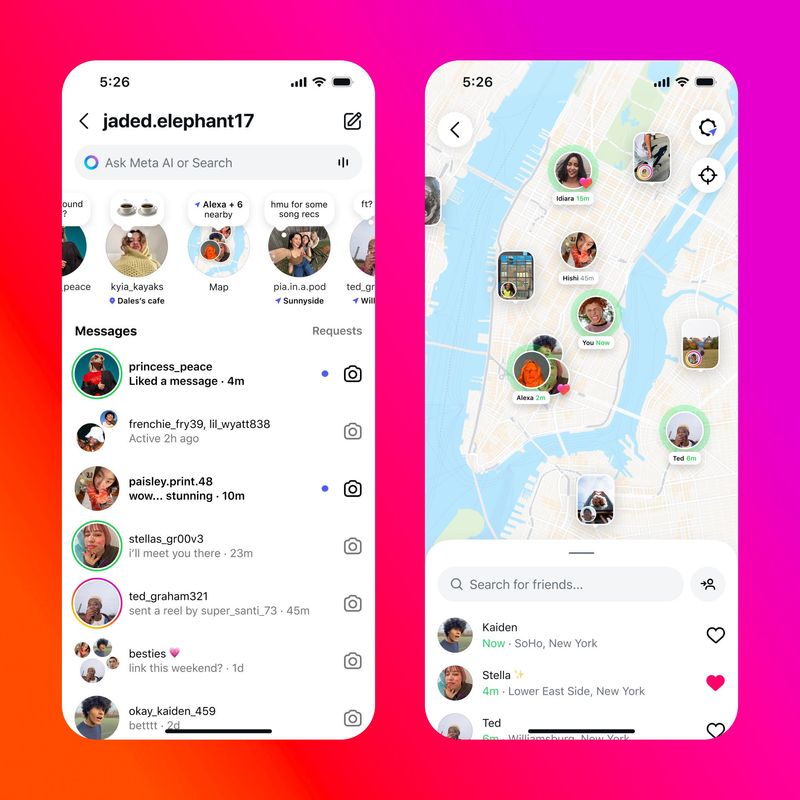

Instagram has introduced new features such as reposts and a map that shows users’ locations. But it appears the latter may already have some users looking at how to disable it, not enjoy it.
Meta announced on Wednesday, Aug. 6, that among the new features coming to the popular social media platform was “Instagram map,” which lets users share their locations and see where their friends and favorite creators are posting from on a map. Content with a tagged location will show up on the map, such as reels, posts, and stories from people that users follow, according to Meta.

Yet a recent rise in queries on Google indicates that some Instagram users want to know how to avoid sharing their locations in light of this new feature. However, using Instagram map doesn’t have to be an all-in experience, as evidenced by the controls that Meta said people can use.
So, here’s what to know the next time you open Instagram.
Where is Instagram map in Instagram?
Instagram map is at the top of your DM (direct message) inbox, said Meta. The new feature began its rollout in the United States on Wednesday, with “more global availability soon.”
How do I turn off location on Instagram?
According to the Instagram Help Center, the location feature is automatically enabled when using the Instagram map.
If you choose to share your location, it’ll be found in the map at the top of your inbox as well as other places like notes, said the help center. But your location services must be on to use this feature.
You can find the location services under the “Settings and Activity” page on your app. There’s a tab called device permissions, which will get you to location services. Clicking on that will redirect you to your phone’s settings (at least on an iPhone) to make the appropriate changes. The Instagram Help Center says that for iPhone users, you can also turn location services on or off by going straight to your phone’s settings, tapping on “Privacy & Security,” which will bring you to location services.
But back to the Instagram map, you can share or not share your location by going to your messages, tapping the map at the top of your inbox and going to settings at the top right, said the help center.
“From here, you can choose who to share your location with,” said Instagram. “You can also choose not to share your location with anyone. Keep in mind that you will only be able to share your location with accounts you follow.”
If you decide not to share your location, Instagram said you can still view the map and see people who are sharing their location with you.
How often does Instagram map share my location?
“If you share your location, it will update each time you open Instagram,” the help center said. “Your location disappears after 24 hours, unless you open the app again.”
Instagram map: Can I change who sees my location, or which locations I share?
Meta said that location sharing is off unless you opt in. So, if you do share your location with users, you can customize the experience by:
Reposts on Instagram: What is that?
Instagram is also introducing a button to repost public reels and feed posts, letting the content you enjoy be recommended to friends’ and followers’ feeds. Your profile will also show a separate tab just to display all your reports.
Paris Barraza is a trending reporter covering California news at The Desert Sun. Reach her at pbarraza@gannett.com.
This article originally appeared on Palm Springs Desert Sun: Does Instagram show your location? What to know about new map feature, reposts
Reporting by Paris Barraza, Palm Springs Desert Sun / Palm Springs Desert Sun
USA TODAY Network via Reuters Connect